You can get photo prints from your phone by ordering custom prints online or printing at home with a phone-connected photo printer. The Bunny Badges glossy prints offer 4×6, 5×7, and 8×10 options for different display needs. For home printing, the Liene M100 is best for phone owners who want a portable 4×6 printer with included paper and cartridges, while the KODAK Dock Plus suits buyers who prefer a printer with an integrated phone dock. Compare these options by print size, printing method, and whether you want delivery or immediate printing.
| Option | Best For | Print Size | How It Works |
|---|---|---|---|
| Bunny Badges Glossy Prints | Ordering prints for frames or decor | 4×6, 5×7, or 8×10 | Upload photos to order |
| Liene M100 | Portable home printing | 4×6 | Print from a phone over Wi-Fi |
| KODAK Dock Plus | Home printing with a phone dock | 4×6 | Connect wirelessly or use the dock |
Liene M100 Portable 4×6 Photo Printer

Best for: Phone owners who want to print 4×6 photos at home without sending files to an outside print service. The listed features support printing from iPhone, Android, and PC, and the printer creates its own Wi-Fi hotspot for a direct connection without another network.
The M100 uses thermal-dye sublimation and comes with 100 sheets of photo paper and three color cartridges. Its laminated prints are described as resistant to water, scratches, fingerprints, and fading. A compact magnetic design supports storage when the printer is not in use.
Why it was selected: It combines phone printing, a self-contained connection, and a supply bundle, making it a practical option for repeated 4×6 prints. Limitation: It prints 4×6 photos, so it is not the listed choice for larger formats such as 5×7 or 8×10. The product notes that smudging may require cleaning the print head.
KODAK Dock Plus 4×6 Photo Printer

Best for: Buyers who want a home printer that can dock a compatible smartphone while printing. The integrated docking station is designed to provide a connection and charge the phone during use. The listed package includes 50 sheets.
The Dock Plus uses KODAK 4PASS dye-sublimation printing. Its process applies three color layers and a clear protective layer; the product describes the resulting prints as resistant to fingerprints, water, and fading. Wireless Bluetooth connection is also listed, giving buyers a way to print without relying solely on the dock.
Why it was selected: The dock-and-charge design distinguishes it from the portable hotspot approach of the Liene M100. Choose this if an integrated phone dock is useful for your printing routine. Limitation: The listed output size is 4×6, and the printer requires a power source for use rather than being described as a handheld printer.
Bunny Badges Glossy 4×6 Photo Prints
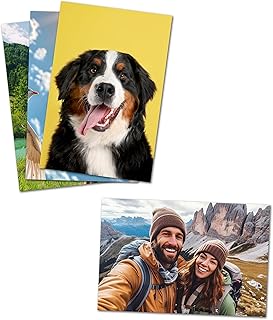
Best for: People who want to order standard 4×6 prints from photos they upload, rather than purchase and operate a printer. The listing describes glossy prints for picture frames, home decor, and wall art, with an advanced printing process intended to produce sharp images, deep tones, and vibrant contrast.
The product is made in the USA according to its listing, and the photo paper is described as durable and fade-resistant. A 4×6 format is a familiar choice for albums and many standard photo frames.
Why it was selected: It offers a straightforward route from phone photo files to physical prints without requiring printer supplies at home. Limitation: The provided product information does not specify order quantity, delivery timing, upload steps, or paper finish options beyond glossy; check those details before ordering.
Bunny Badges Glossy 5×7 Photo Prints
Best for: Buyers who want a larger-than-4×6 print for a frame or display. The listing allows customers to upload their own photos and describes the prints as glossy, with sharp image output, deep tones, and vibrant contrast. The paper is described as durable and fade-resistant.
Why it was selected: The 5×7 format provides a middle option between compact standard prints and larger wall-display prints. Choose it if the photo needs more visual space than a 4×6 print but you do not need the listed 8×10 size.
Limitation: The product information does not state cropping rules, print quantities, or delivery estimates. Check the image preview and order details so the selected format suits the photo and frame.
Bunny Badges Glossy 8×10 Photo Prints
Best for: People ordering a larger photo for home decor, wall art, or an 8×10 frame. Customers can upload their own photos, and the listing highlights sharp image detail, deep tones, vibrant contrast, and photo paper described as durable and fade-resistant.
Why it was selected: Of the three listed custom-print formats, 8×10 is the largest and is better suited to a prominent display than small album prints. Choose this size when the intended frame or display area calls for a larger image.
Limitation: A larger print may reveal image softness or cropping more clearly, so review the photo and order preview where available. The provided features do not specify minimum image resolution or exact cropping behavior.
Buying Guide: How To Choose Phone Photo Prints
Do you want delivered prints or a printer at home?
Choose an upload-your-own-photo print service if you want finished prints without maintaining a printer or stocking paper and cartridges. Choose the Liene or KODAK printer if you want to produce prints at home. A home printer can be useful for frequent printing, while ordering prints avoids managing printing supplies yourself.
Which print size fits the photo and frame?
Match the print size to the frame, album, or display before ordering. The listed custom options are 4×6, 5×7, and 8×10. Both printers in this selection produce 4×6 photos. Check whether the photo’s proportions fit the selected size, since cropping can affect what appears in the final print.
How should you compare phone connections?
The Liene M100 uses its own Wi-Fi hotspot, while the KODAK Dock Plus lists wireless Bluetooth and an integrated docking station. Choose based on the connection method that suits your phone and setup. Confirm device compatibility and connection instructions in the product details before purchase.
What should you check before ordering?
Review the selected size, finish, quantity, image crop, and shipping details. For a printer, check the included paper and cartridges, connection method, and the cost and availability of additional supplies. Product listings can differ in order and package details, so verify the current information before checkout.
Frequently Asked Questions
Can I order photo prints directly from my phone?
Yes. The listed custom-print options let customers upload their own photos. The exact upload process and supported file types are not specified in the provided product information.
Which option is best for 4×6 prints at home?
The Liene M100 and KODAK Dock Plus both print 4×6 photos. The Liene includes 100 sheets and three cartridges and connects through its own Wi-Fi hotspot; the KODAK offers an integrated phone dock and lists 50 sheets.
Can I order 5×7 or 8×10 prints?
The Bunny Badges listings include glossy 5×7 and 8×10 photo prints. The two printers described here are listed for 4×6 output.
Are the listed prints glossy?
The Bunny Badges 4×6, 5×7, and 8×10 products are identified as glossy. The printer listings describe their print processes and protective finishes but do not use the same glossy product label.
What should I check to avoid unwanted cropping?
Compare the photo’s shape with the print dimensions and review any cropping or preview controls provided during ordering. The supplied product details do not specify exact crop settings.